Lawzone - Lawyer WordPress Theme
Created: 1 October 2022
Latest Update: 29 July 2025
Version: 1.0
Recommended WordPress Version : 6.7 & Above/p>
By: risingthemes
Email : support@risingthemes.net
Thank you very much for purchasing our theme.
We hope you have enjoyed the template’s live preview and you want to create such a beautiful website. Now, this documentation is everything needed for you to setup your perfect website. Please follow each instruction carefully, even single a line of code can do wonders (in all senses) so please don’t miss anything on this user guide
If you have any question, please feel free to contact us.
Read this before you edit anything
1. Why this documentation is very important?
We are sure that we have covered all the essential instructions needed to setup a nice theme as you see in our template’s live preview. We expect you to read this user guide before you open any support request (if you ask about things already present in this guide, you will be gently asked to read this again
2. If I need help, will you provide free support?
Yes, we have a dedicated support system where we offer free support. Our support is applicable only for issues and bugs within our product. We do NOT provide free customisation services in the scope of free support.
3. What kind of support are you providing?
We offer free support for our products where we can help you fix issues within our code (if any) and assist you on theme setup. Please note support is not applicable for third party jQuery plugins and GPL code components (because they are not created or maintained by us).
4. When can I expect a response from you?
Our team will be online during 10.00 to 17.00 on Monday – Friday (IST, India). For support request we usually make a response within 24 hours. Due to the complex nature of some queries, responses can’t be guaranteed a specific turn-around time, but we value each user and we will surely get back to you. In case if we experience heavy load of support tickets we will announce the status on Twitter.
5. If I need to customize this template will you offer it?
We are unable to provide free customisation services on our products. If you have great passion and considerable budget please open the request as a premium project, please email to: support@risingthemes.net We will get back to you via email.
6. How can I know about future updates and bug fixes?
We release updates regularly and we notify our users via Tweets as well as Email Newsletters (we do hate spam).
Theme Installation
1. Through WordPress Dashboard
- Go to the menu Appearance > Themes and click on Add New button.
- Click on Upload Theme button.
- Click on Browse button and navigate to the unzipped theme package on your computer.
- Look for a file called lawzone-pro.zip Click on it to select, then click OK.
- Click on Install Now button and wait until the installation is complete.
- Click on Activate link to activate the theme on your WordPress site.
- Go to Appearance >> Theme Options >> Restore Default.
Manual Installation using FTP client
If you know the FTP login details of the server where your site is hosted and you have a FTP client installed (such as FileZilla), you might consider using this way of uploading your theme.
- Unzip the lawzone-pro.zip file
- Upload theme to /wp-content/themes/
- Go to Appearance -> Themes and activate theme from Dashboard.
First you have to unzip the download file, find the zip file called percepriona-pro.zip, unzip it and upload the folder to the main WordPress installation folder » wp-content » themes. Please note that if you prefer this way of installation, you have to make sure that the main files of the theme are contained just within one folder of the themes folder.
You can activate the theme after it is uploaded on the server. In order to activate this theme you have to go to the admin panel » Appearance » Themes. In this section you should see the theme with a title haircut. Just click on the Activate button and your theme should get activated.
Homepage Setup
After activating the haircut theme, setup homepage using following
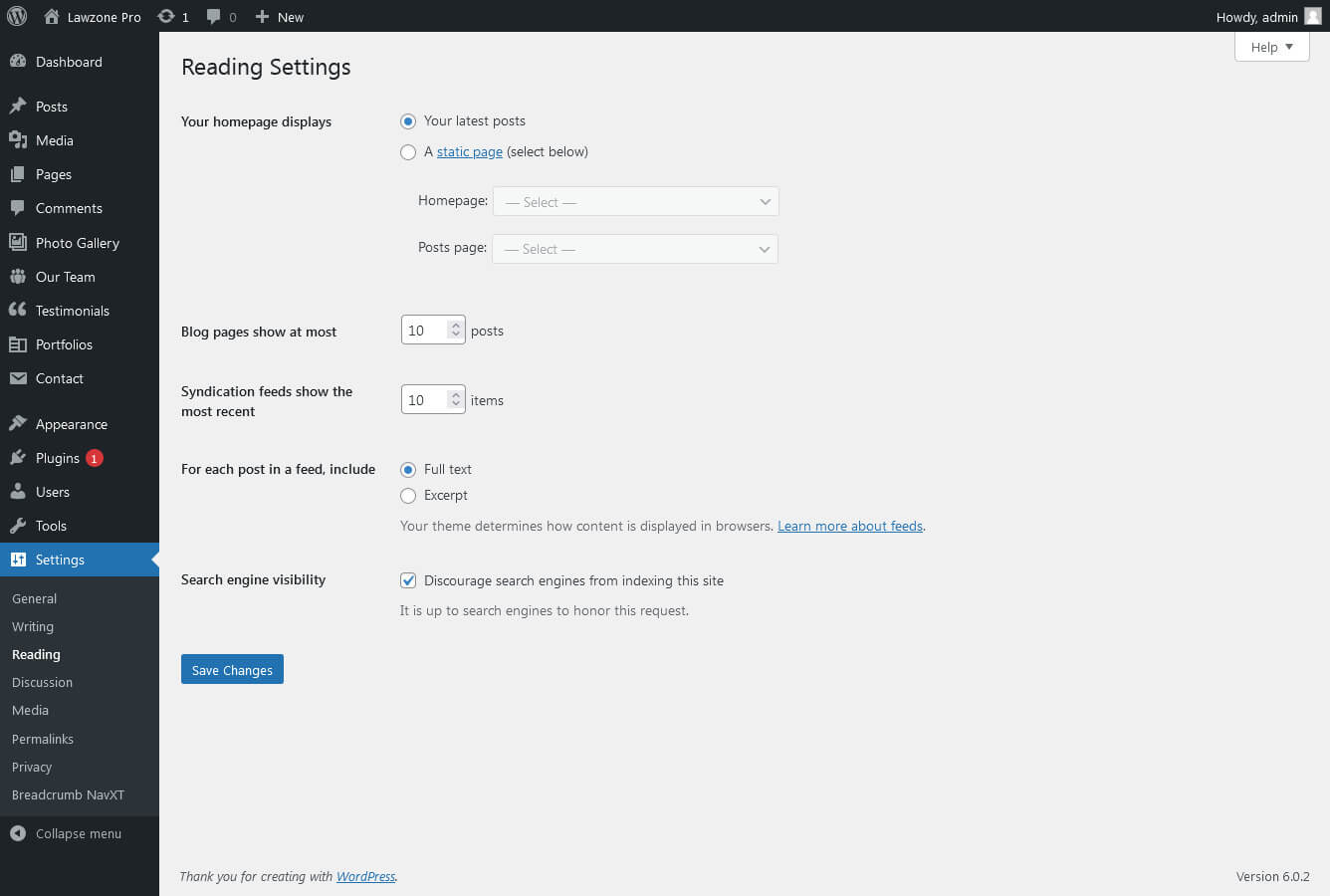
- Go to Settings -> Reading -> Front page displays
- Click on radio button of Your latest posts
- Go to Appearance -> Theme Options and click on Restore Defaults in bottom side
Header Setting
The header consists of four main elements:
- Site Name / Logo
- Navigation Menu

1. Setting the Site Logo
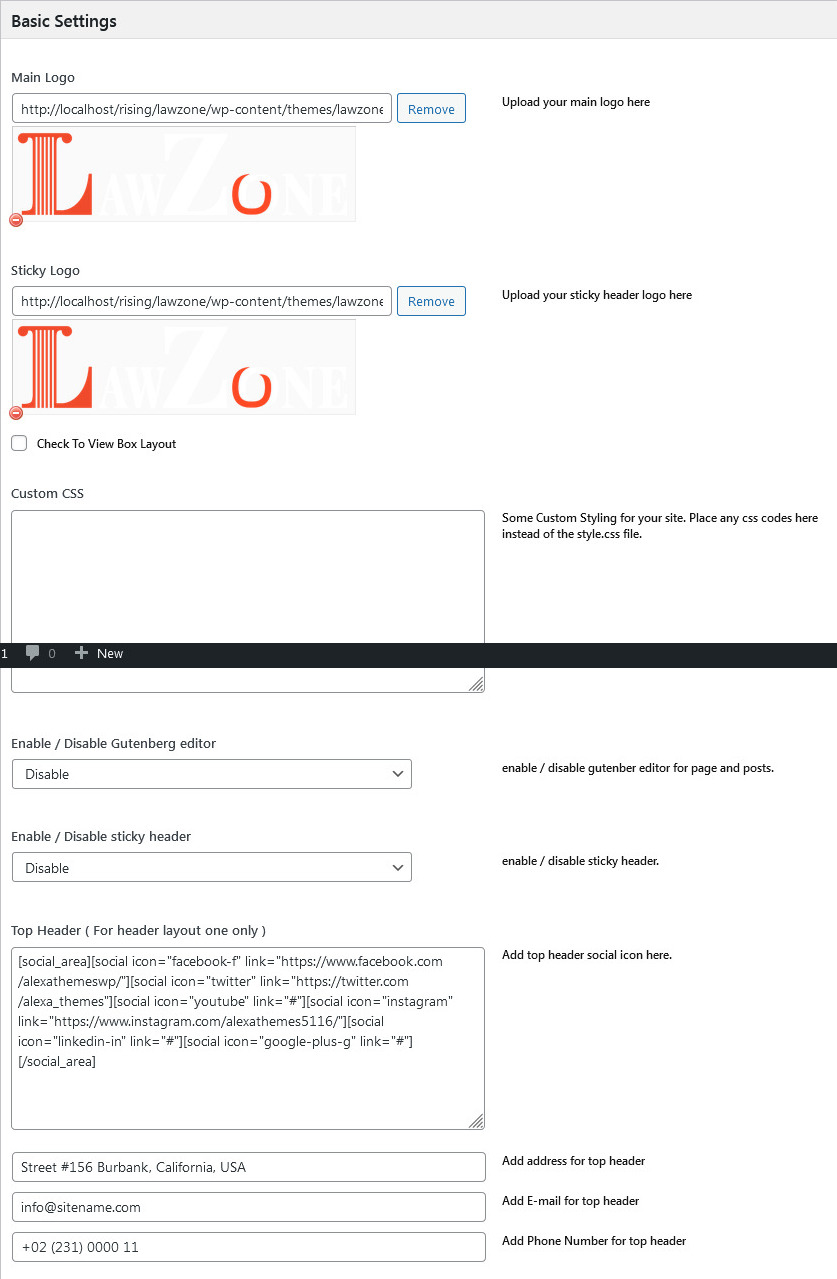
The settings for to change the Site Logo is located in Appearance » Theme Options » Basic Setting
Setup Navigation
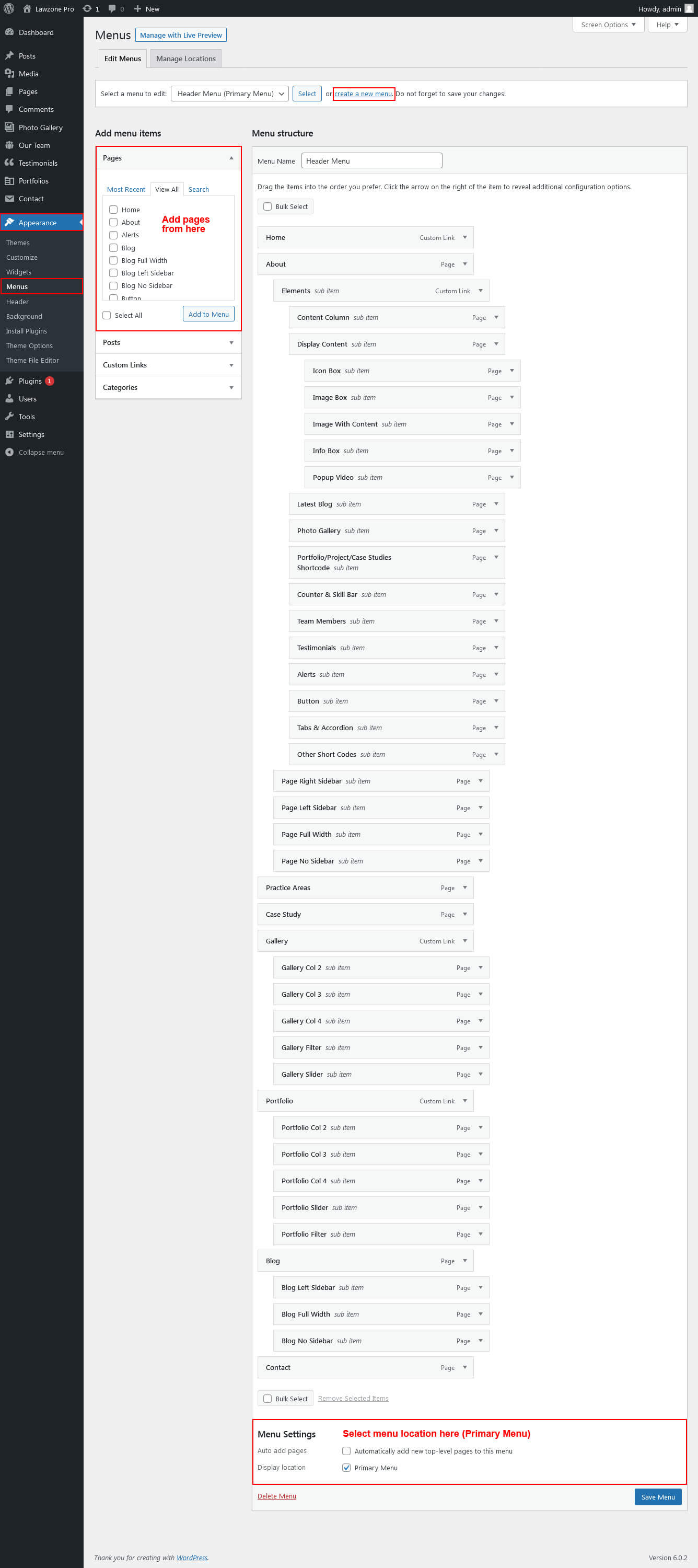
1. Multipage Menu
- First of all create pages from Pages >> Add new page
- Go to Appearance >> Menu
- Click on Create a new menu link
- Give a name to your menu in Menu name and click save menu button
- Once you have create menu. You need to add pages by selecting with checkboxes. After adding menu list you can arrange it by drag and drop.
- Select menu theme locations Primary Menu Left and Primary Menu Right from Menu Settings
- Click Save Menu after adding required pages, categories in the menu
Primary Menu
Setup Homepage Slider

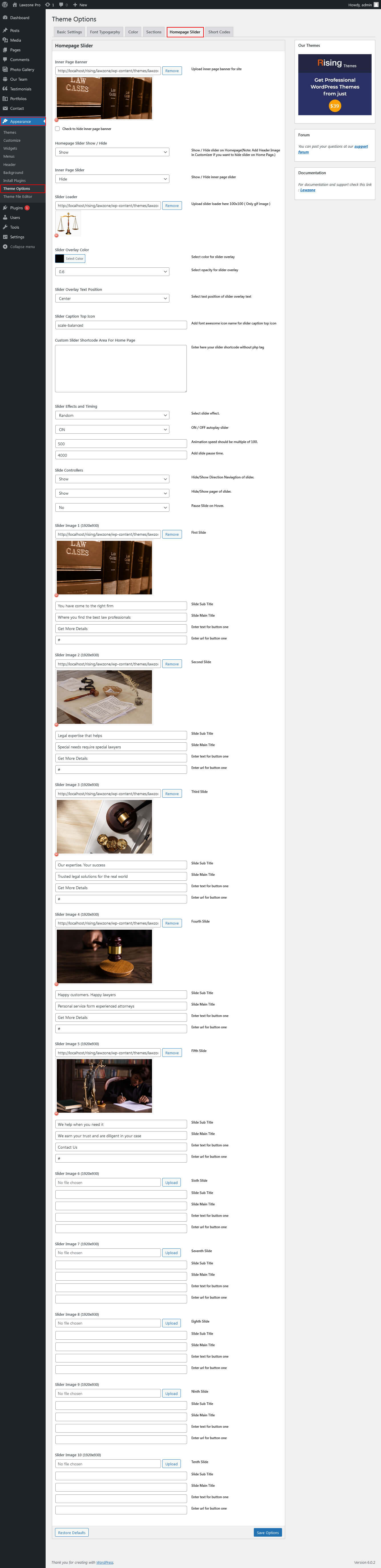
In order to add slides to homepage slider go to the Appearance » Theme Options » Homepage Slider
For each slide there are different options that you can apply.
- You can change Home Page Slider Hide/Show.
- You can change Slider Effects and Timing.
- You can change Slider Animation speed, pause time
- You can change Slider Hide/Show Direction Naviagtion of slider.
- You can change Slider Hide/Show pager of slider.
- You can change Slider Pause Slide on Hover.
- Slider images should be of size 1920 × 1080 pixels
If you don't want to use this default image slider, you can use any image slider WordPress plugin
- Go to Appearance » Theme Options » Homepage Slider
- Enter your slider shortcode which is provided by plugin without php tag
Sections
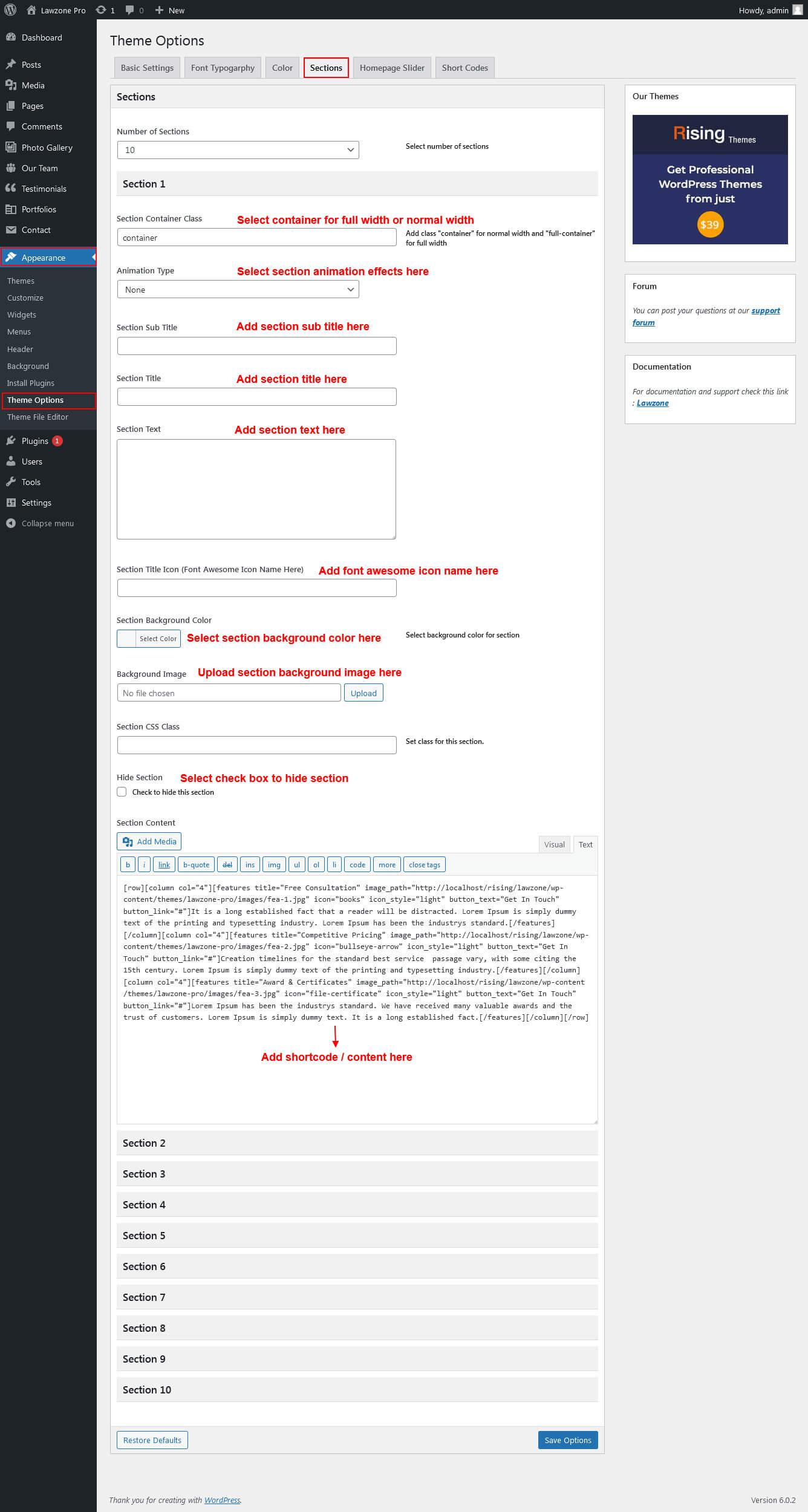
Section setting
Homepage Sections
The homepage contatins lots of section to create beautiful and professional website.
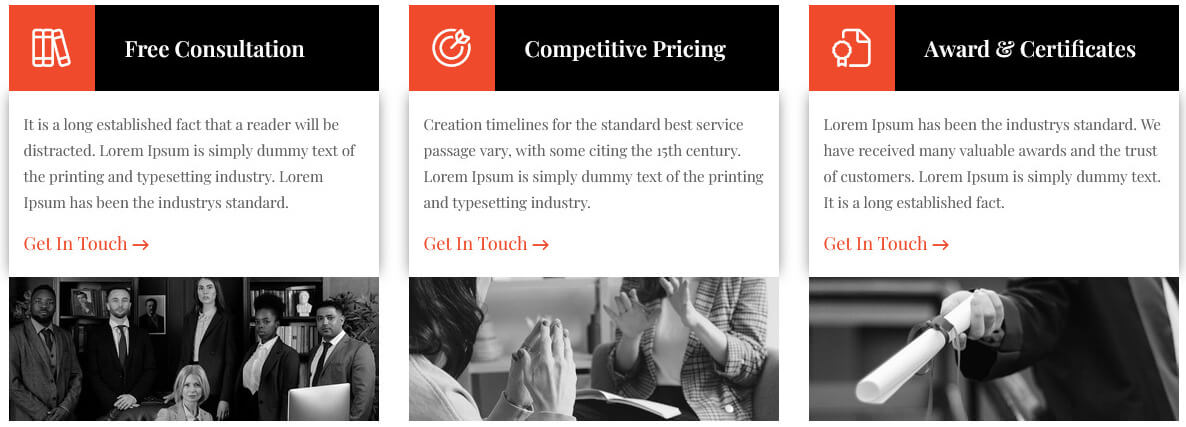
1. Features Section
- To manage this section go to Appearance » Theme Options » Sections » Section 1
- Use this shortcode to display Features section :
- [row][column col="4"][features title="Free Consultation" image_path="http://localhost/rising/lawzone/wp-content/themes/lawzone-pro/images/fea-1.jpg" icon="books" icon_style="light" button_text="Get In Touch" button_link="#"]It is a long established fact that a reader will be distracted. Lorem Ipsum is simply dummy text of the printing and typesetting industry. Lorem Ipsum has been the industrys standard.[/features][/column][column col="4"][features title="Competitive Pricing" image_path="http://localhost/rising/lawzone/wp-content/themes/lawzone-pro/images/fea-2.jpg" icon="bullseye-arrow" icon_style="light" button_text="Get In Touch" button_link="#"]Creation timelines for the standard best service passage vary, with some citing the 15th century. Lorem Ipsum is simply dummy text of the printing and typesetting industry.[/features][/column][column col="4"][features title="Award & Certificates" image_path="http://localhost/rising/lawzone/wp-content/themes/lawzone-pro/images/fea-3.jpg" icon="file-certificate" icon_style="light" button_text="Get In Touch" button_link="#"]Lorem Ipsum has been the industrys standard. We have received many valuable awards and the trust of customers. Lorem Ipsum is simply dummy text. It is a long established fact.[/features][/column][/row]
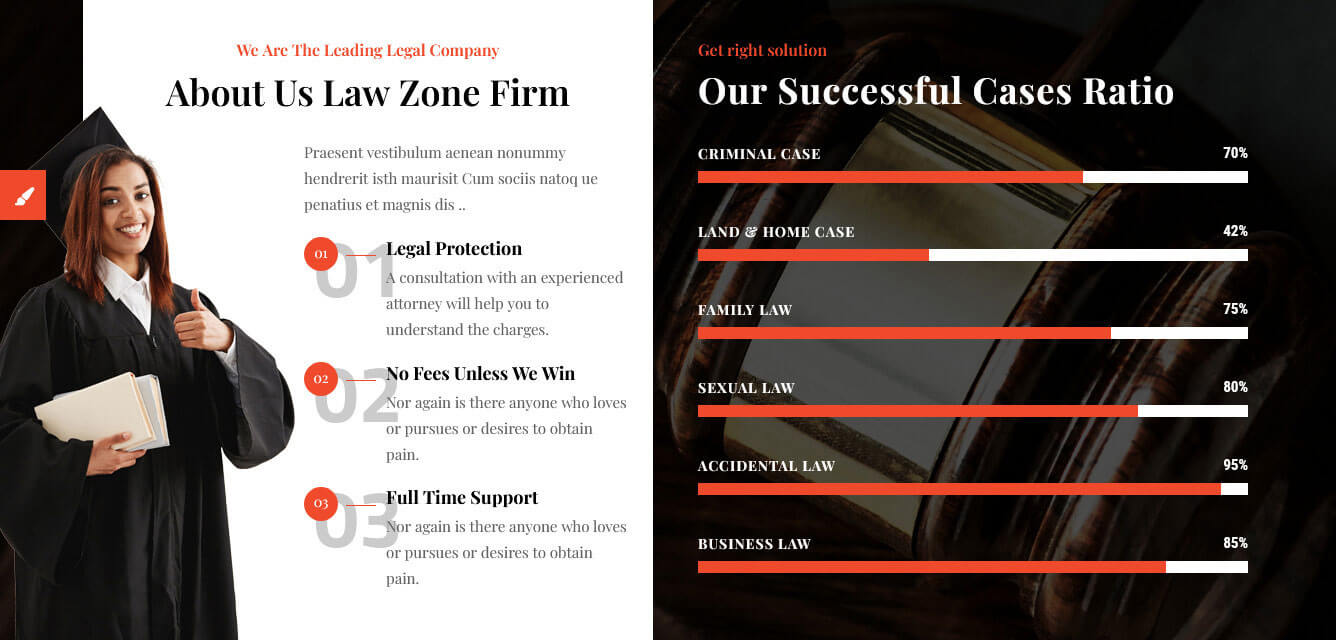
2. About Us & Cases Ratio Section
- To manage this section go to Appearance » Theme Options » Sections » Section 2
- Use this shortcode to display About Us & Cases Ratio section :
- [row][column col="6"][about_left title="About Us Law Zone Firm" sub_title="We Are The Leading Legal Company" image_path="http://localhost/rising/lawzone/wp-content/themes/lawzone-pro/images/progress-img.png"]Praesent vestibulum aenean nonummy hendrerit isth maurisit Cum sociis natoq ue penatius et magnis dis ..[infobox num="01" title="Legal Protection"]A consultation with an experienced attorney will help you to understand the charges.[/infobox][infobox num="02" title="No Fees Unless We Win"]Nor again is there anyone who loves or pursues or desires to obtain pain.[/infobox][infobox num="03" title="Full Time Support"]Nor again is there anyone who loves or pursues or desires to obtain pain.[/infobox][/about_left][/column][column col="6" subcls="abt-skill"][custom_heading sml_ttl="Get right solution" sml_title_color="#ef4a2b" title="Our Successful Cases Ratio" title_color="#ffffff" font_size="36px" font_family="Playfair Display" align="left"][skill title="Criminal Case" percent="70"][skill title="Land & Home Case" percent="42"][skill title="Family Law" percent="75"][skill title="Sexual Law" percent="80"][skill title="Accidental Law" percent="95"][skill title="Business Law" percent="85"][/column][/row]
3. Practice Services
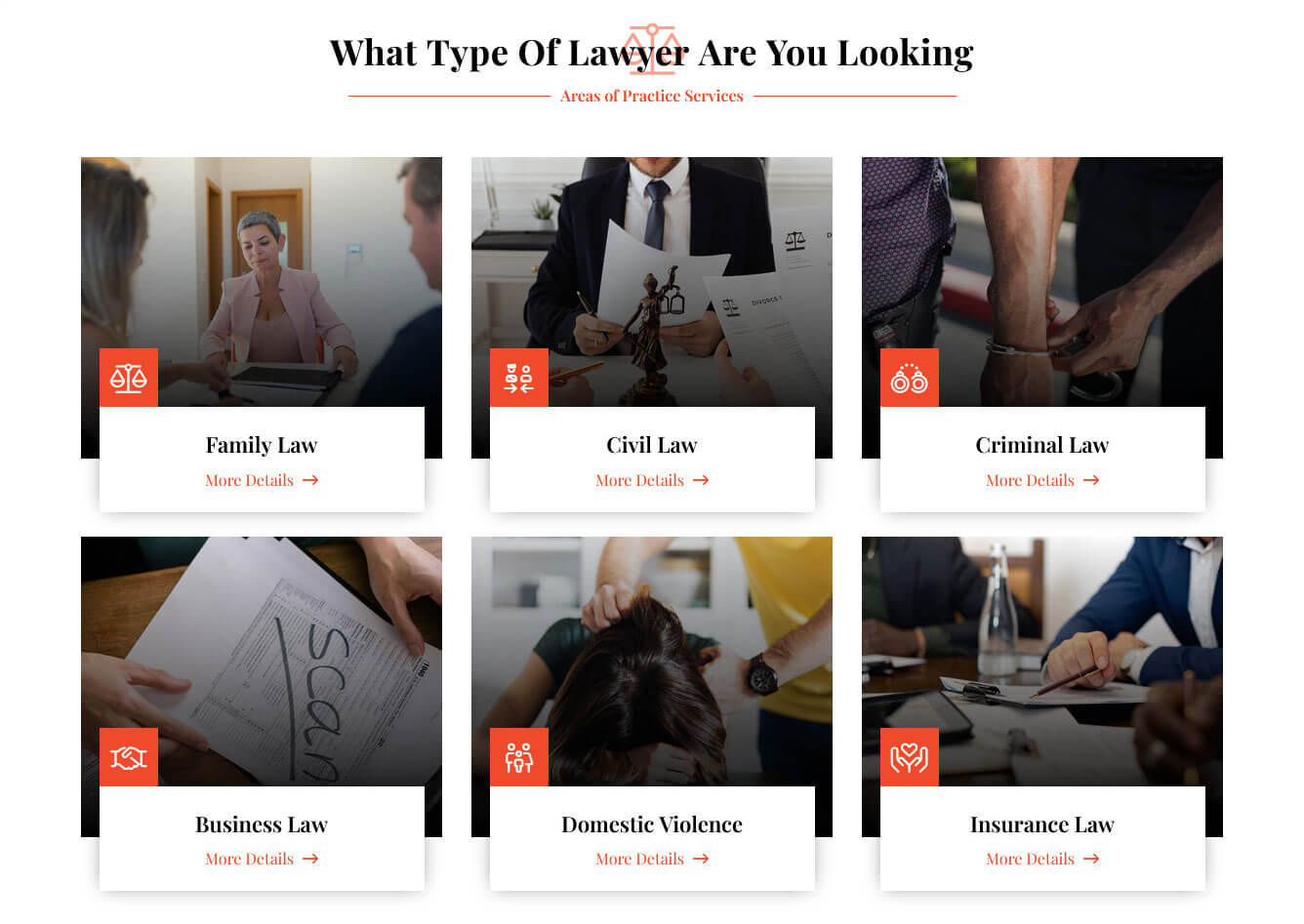
- To manage this section go to Appearance » Theme Options » Sections » Section 3
- Use this shortcode to display Practice Services section :
- [row][column col="4"][services image_path="http://localhost/rising/lawzone/wp-content/themes/lawzone-pro/images/ser-1.jpg" title="Family Law" icon="scale-balanced" icon_style="light" button_text="More Details" button_link="#"]Grursus mal suada faci lisis is the dummy more ipsum ready consectet the elit.[/services][/column][column col="4"][services image_path="http://localhost/rising/lawzone/wp-content/themes/lawzone-pro/images/ser-2.jpg" title="Civil Law" icon="person-military-to-person" icon_style="light" button_text="More Details" button_link="#"]Grursus mal suada faci lisis is the dummy more ipsum ready consectet the elit.[/services][/column][column col="4"][services image_path="http://localhost/rising/lawzone/wp-content/themes/lawzone-pro/images/ser-3.jpg" title="Criminal Law" icon="handcuffs" icon_style="light" button_text="More Details" button_link="#"]Grursus mal suada faci lisis is the dummy more ipsum ready consectet the elit.[/services][/column][column col="4"][services image_path="http://localhost/rising/lawzone/wp-content/themes/lawzone-pro/images/ser-4.jpg" title="Business Law" icon="handshake" icon_style="light" button_text="More Details" button_link="#"]Grursus mal suada faci lisis is the dummy more ipsum ready consectet the elit.[/services][/column][column col="4"][services image_path="http://localhost/rising/lawzone/wp-content/themes/lawzone-pro/images/ser-5.jpg" title="Domestic Violence" icon="family" icon_style="light" button_text="More Details" button_link="#"]Grursus mal suada faci lisis is the dummy more ipsum ready consectet the elit.[/services][/column][column col="4"][services image_path="http://localhost/rising/lawzone/wp-content/themes/lawzone-pro/images/ser-6.jpg" title="Insurance Law" icon="hands-holding-heart" icon_style="light" button_text="More Details" button_link="#"]Grursus mal suada faci lisis is the dummy more ipsum ready consectet the elit.[/services][/column][/row]
4. Counter
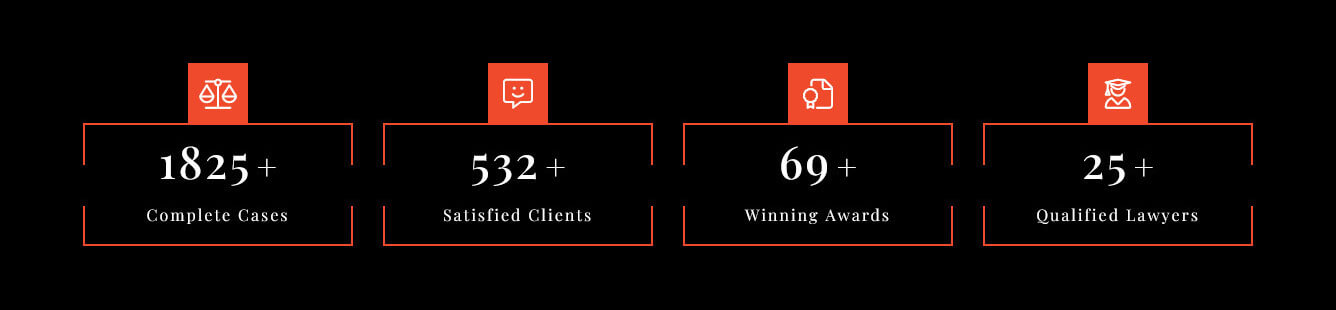
- To manage this section go to Appearance » Theme Options » Sections » Section 4
- Use this shortcode to display Counter :
- [counter_wrap][counter icon="scale-balanced" icon_style="light" title="Complete Cases" count="1825" num_color="#ffffff" title_color="#ffffff" icon_color="#ffffff" plus="yes"][counter icon="message-smile" icon_style="light" title="Satisfied Clients" count="532" num_color="#ffffff" title_color="#ffffff" icon_color="#ffffff" plus="yes"][counter icon="file-certificate" icon_style="light" title="Winning Awards" count="69" num_color="#ffffff" title_color="#ffffff" icon_color="#ffffff" plus="yes"][counter icon="user-graduate" icon_style="light" title="Qualified Lawyers" count="25" num_color="#ffffff" title_color="#ffffff" icon_color="#ffffff" plus="yes"][/counter_wrap]
5. Qualified Attorneys Team
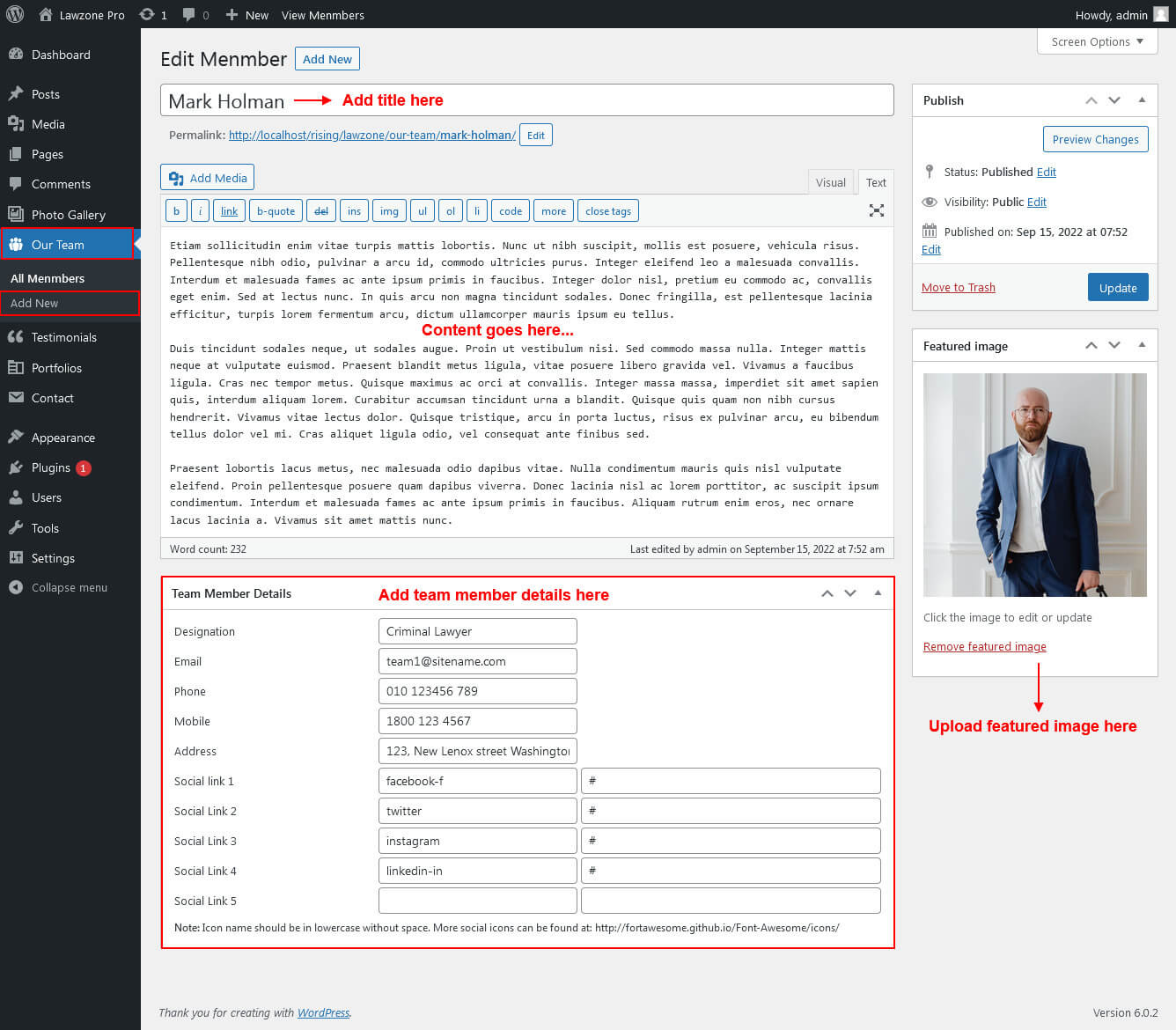
This section is used to display Qualified Attorneys Team
- First of all create new posts from Our Team -> Add New
- To manage this Team section go to Appearance » Theme Options » Sections » Section 5
- Use this shortcode to display Our Team in Grid View: [our-team type="grid" show="-1" column="2/3/4"]
- Use this shortcode to display Our Team in Slider View: [our-team type="slider" show="-1"]

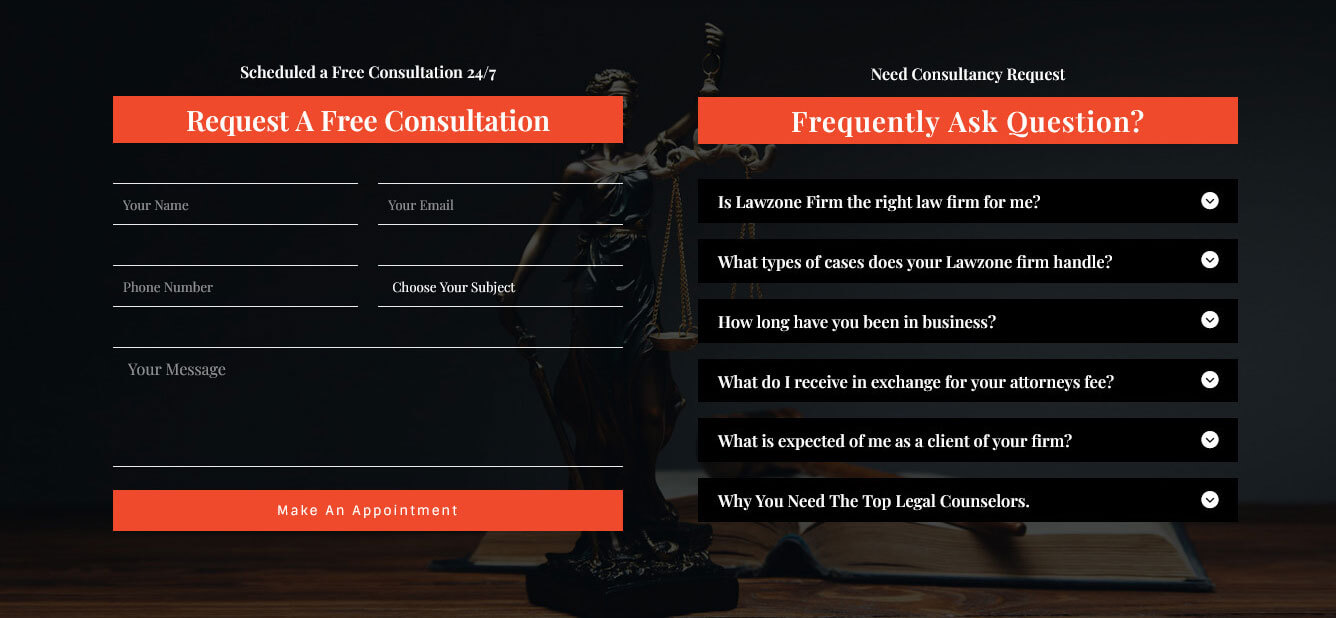
6. Consultation Form & FAQ
This section is used to display Consultation Form & FAQ
- To manage this section go to Appearance » Theme Options » Sections » Section 6
- Use this shortcode to display Consultation Form & FAQ :
- [row][column col="6"][consultation_form sub_title="Scheduled a Free Consultation 24/7" title="Request A Free Consultation" form_name="Free Consultation" form_id="182"][/column][column col="6" subcls="faq-bx"][custom_heading sml_ttl="Need Consultancy Request" sml_title_color="#ffffff" title="Frequently Ask Question?" title_color="#ffffff" font_size="28px" font_family="Playfair Display" align="center"][toggle_wrap][toggle_content title="Is Lawzone Firm the right law firm for me?"]Choosing a Lawzone firm to represent you and your case is one of the most important decisions you can make. We understand that your case is important to you and choosing the right firm and attorneys to represent you could make the difference for your case.[/toggle_content][toggle_content title="What types of cases does your Lawzone firm handle?"]Choosing a Lawzone firm to represent you and your case is one of the most important decisions you can make. We understand that your case is important to you and choosing the right firm and attorneys to represent you could make the difference for your case.[/toggle_content][toggle_content title="How long have you been in business?"]Choosing a Lawzone firm to represent you and your case is one of the most important decisions you can make. We understand that your case is important to you and choosing the right firm and attorneys to represent you could make the difference for your case.[/toggle_content][toggle_content title="What do I receive in exchange for your attorneys fee?"]Choosing a Lawzone firm to represent you and your case is one of the most important decisions you can make. We understand that your case is important to you and choosing the right firm and attorneys to represent you could make the difference for your case.[/toggle_content][toggle_content title="What is expected of me as a client of your firm?"]Choosing a Lawzone firm to represent you and your case is one of the most important decisions you can make. We understand that your case is important to you and choosing the right firm and attorneys to represent you could make the difference for your case.[/toggle_content][toggle_content title="Why You Need The Top Legal Counselors."]Choosing a Lawzone firm to represent you and your case is one of the most important decisions you can make. We understand that your case is important to you and choosing the right firm and attorneys to represent you could make the difference for your case.[/toggle_content][/toggle_wrap][/column][/row]
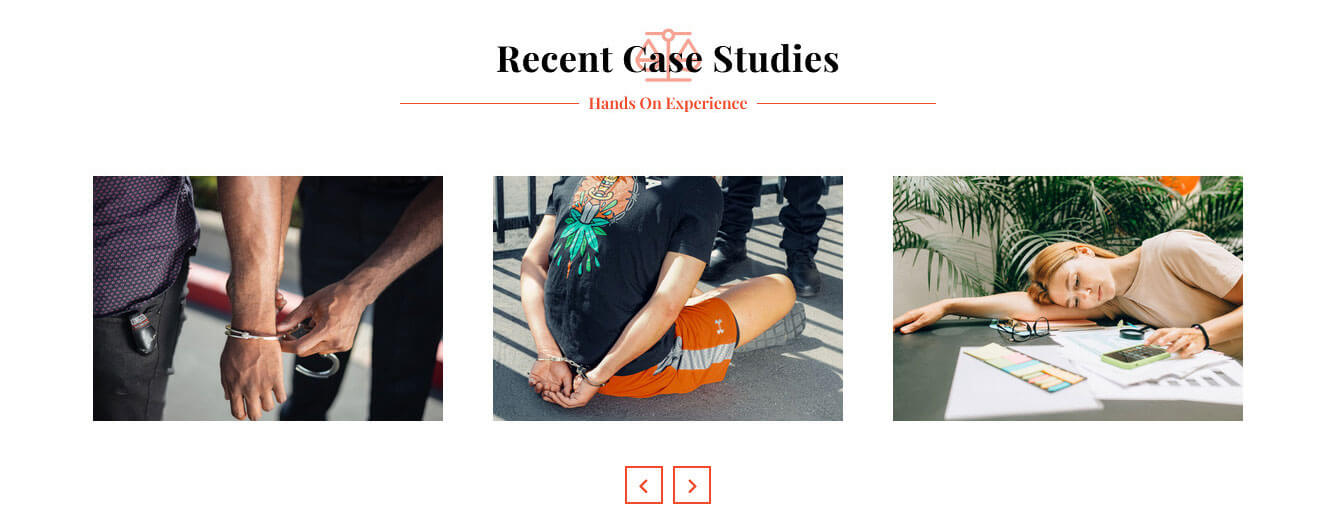
7. Recent Case Studies / Portfolio
This section is used to display Recent Case Studies / Portfolio in your website
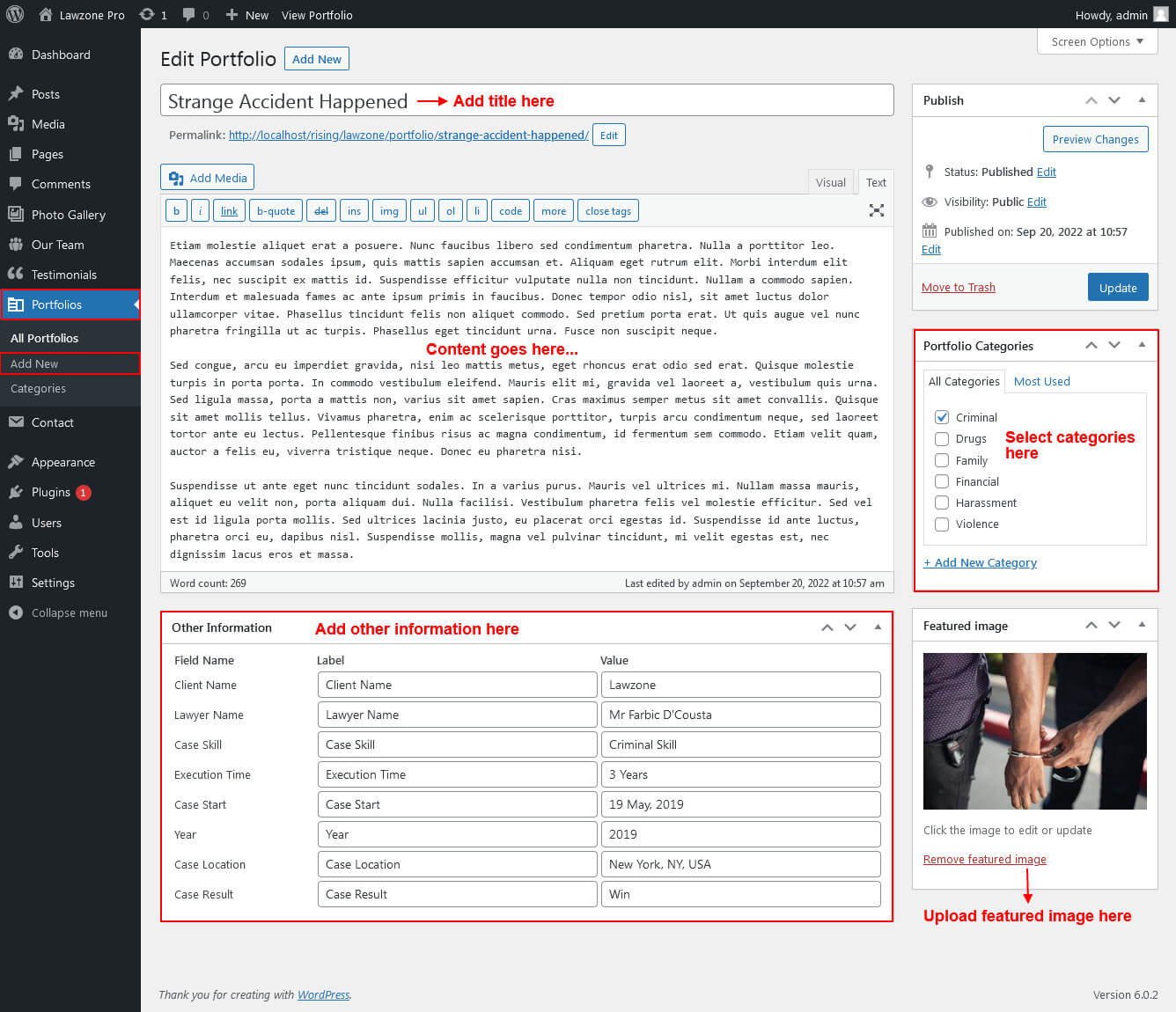
- First of all create new posts from Portfolio -> Add Portfolio/Cases
- To manage this Cases / Portfolio section go to Appearance » Theme Options » Sections » Section 7
- Use this shortcode to display Cases/Portfolio Slider Type: [portfolio type="slider" show="-1"]
- Use this shortcode to display Cases/Portfolio Grid Type: [portfolio type="grid" show="-1" column="2/3/4" filter="false"]
- Use this shortcode to display Cases/Portfolio Filter Type: [portfolio type="grid" show="-1" column="2/3/4" filter="true"]
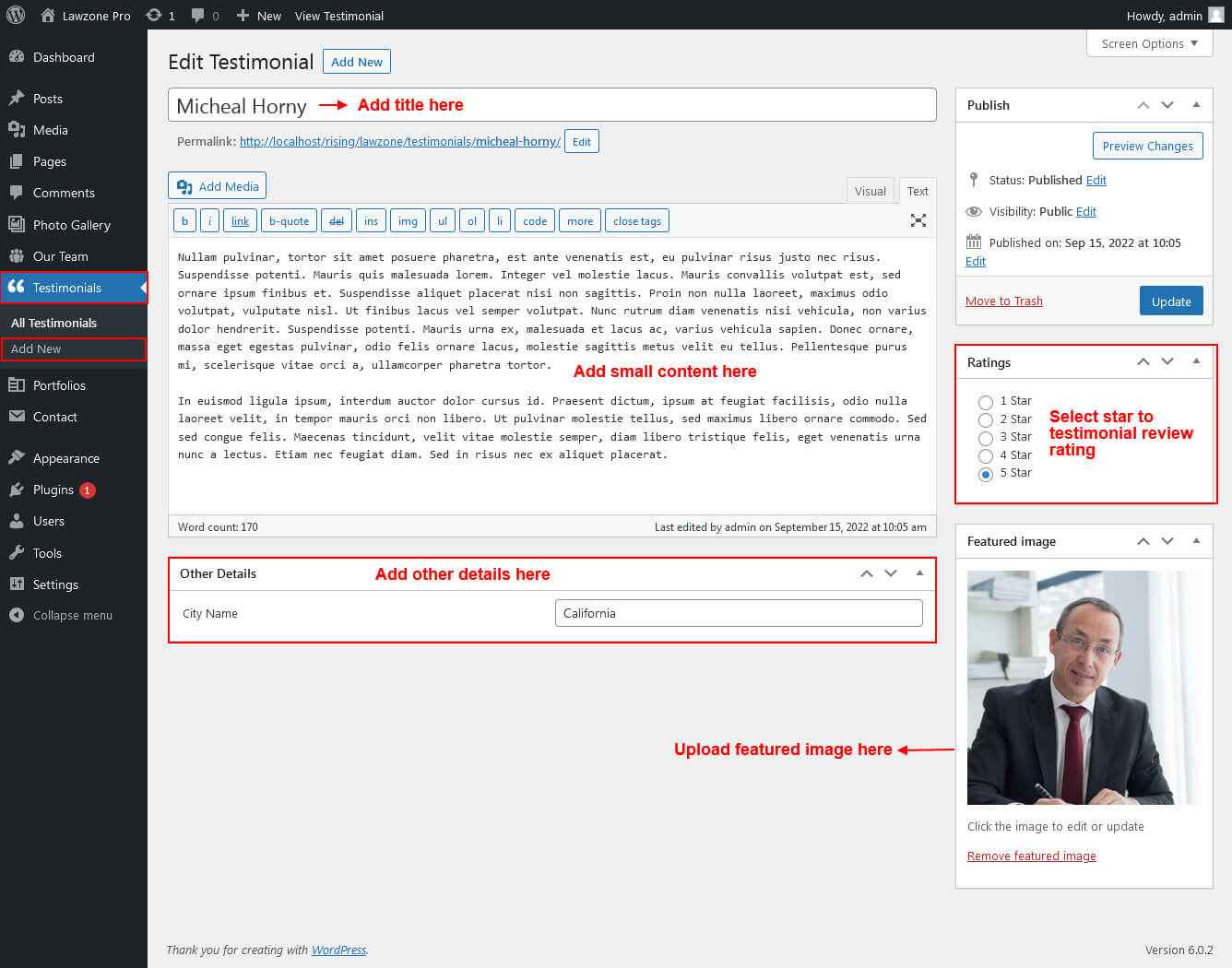
8. Our Clients Says Testimonials
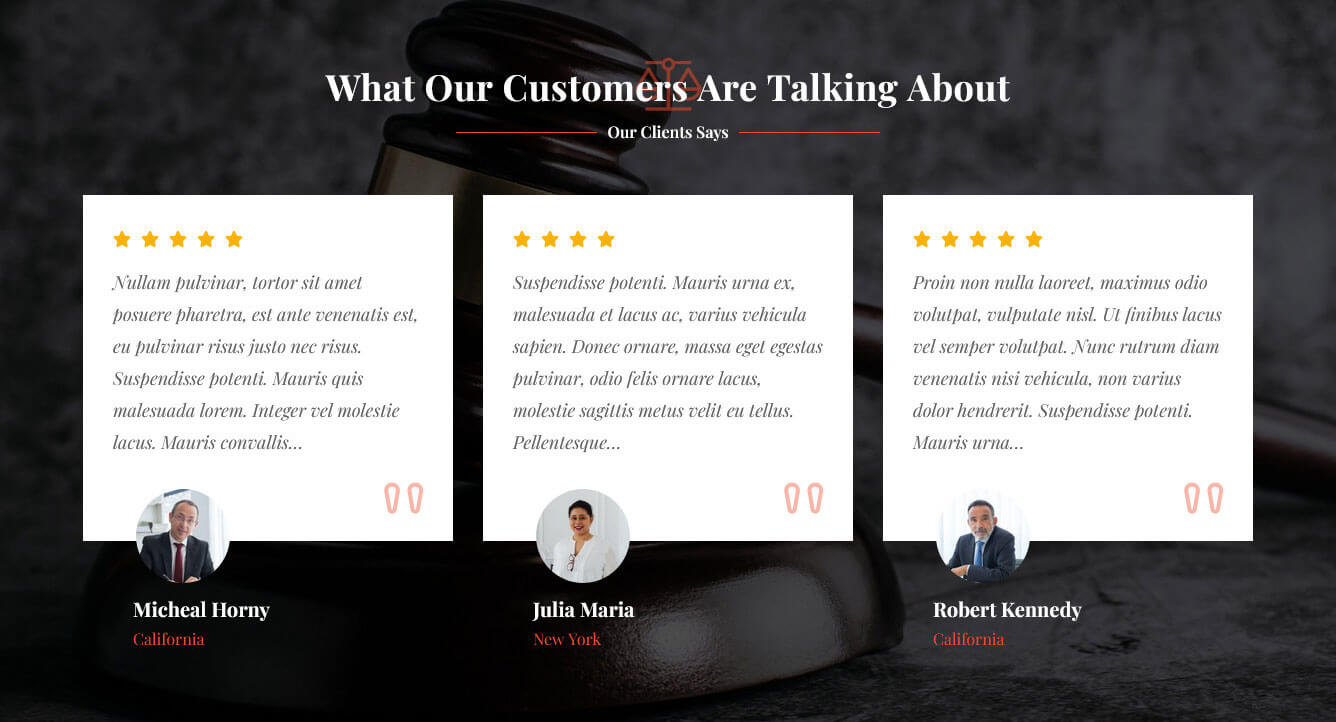
This section is used to display testimonials in your website
- First of all create new posts from Testimonials -> Add Testimonials
- To manage this testimonials section go to Appearance » Theme Options » Sections » Section 8
- Use this shortcode to display Testimonials: [testimonials show="4"]
- Use this shortcode to display Testimonials Listing: [testimonials-listing show="4"]
- Use this shortcode to display Testimonials Sidebar Rotator: [sidebar-testimonials show="4"]
9. Pricing Plans
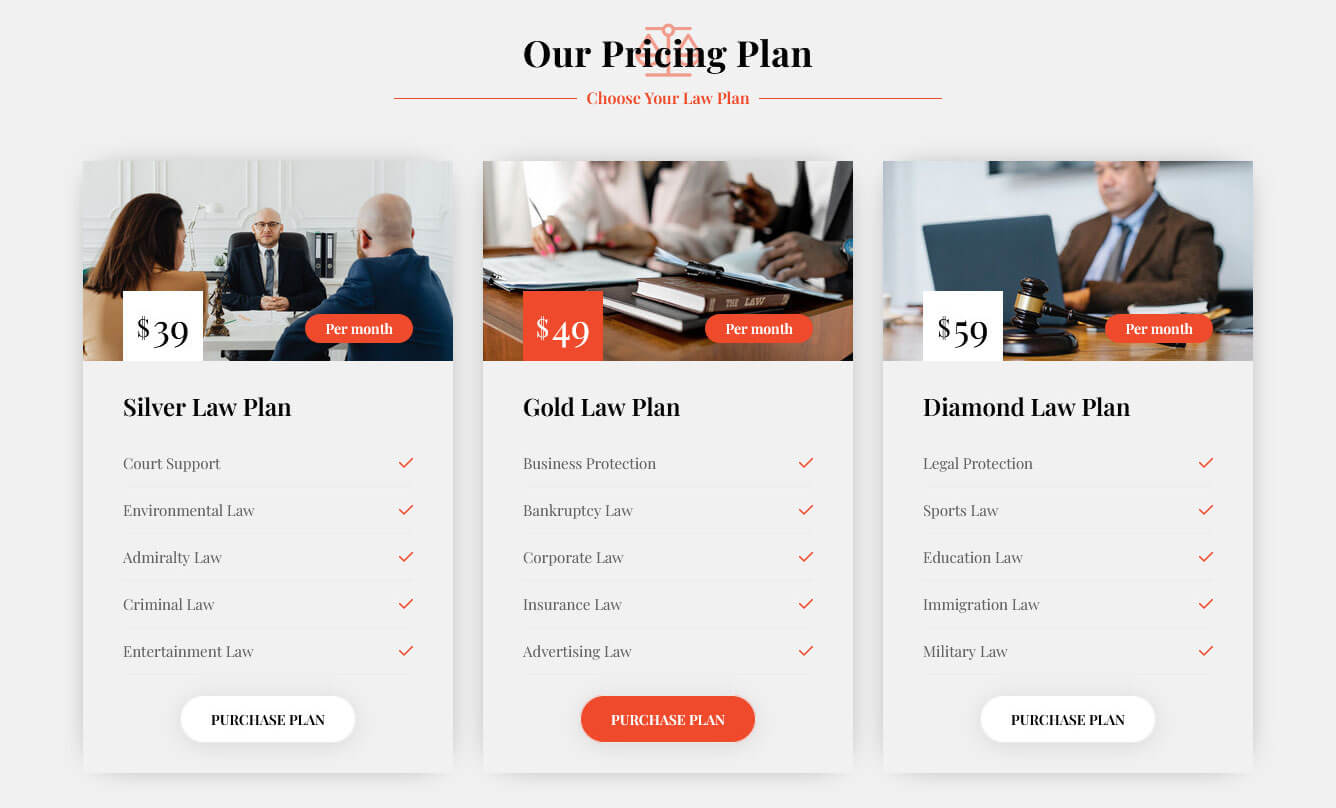
This section is used to display Pricing Plans
- To manage this section go to Appearance » Theme Options » Sections » Section 9
- Use this shortcode to display Pricing Plans :
- [row][column col="4"][pricing-plan image_path="http://localhost/rising/lawzone/wp-content/themes/lawzone-pro/images/price-1.jpg" title="Silver Law Plan" price="39" price_sign="$" per_month="Per month" row1="Court Support" row2="Environmental Law" row3="Admiralty Law" row4="Criminal Law" row5="Entertainment Law" btn_label="Purchase Plan" btn_link="#"][/column][column col="4"][pricing-plan image_path="http://localhost/rising/lawzone/wp-content/themes/lawzone-pro/images/price-2.jpg" title="Gold Law Plan" price="49" price_sign="$" per_month="Per month" highlight="yes" row1="Business Protection" row2="Bankruptcy Law" row3="Corporate Law" row4="Insurance Law" row5="Advertising Law" btn_label="Purchase Plan" btn_link="#"][/column][column col="4"][pricing-plan image_path="http://localhost/rising/lawzone/wp-content/themes/lawzone-pro/images/price-3.jpg" title="Diamond Law Plan" price="59" price_sign="$" per_month="Per month" row1="Legal Protection" row2="Sports Law" row3="Education Law" row4="Immigration Law" row5="Military Law" btn_label="Purchase Plan" btn_link="#"][/column][/row]
10. Recent News
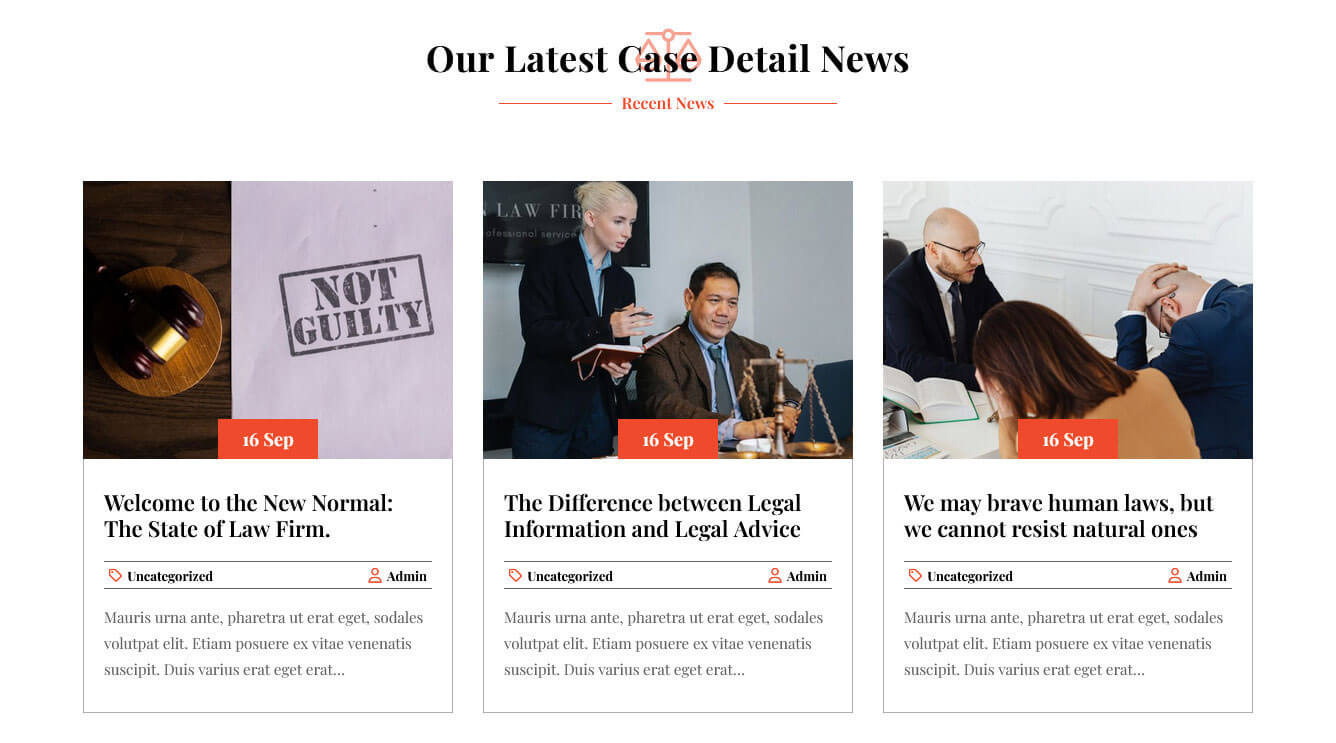
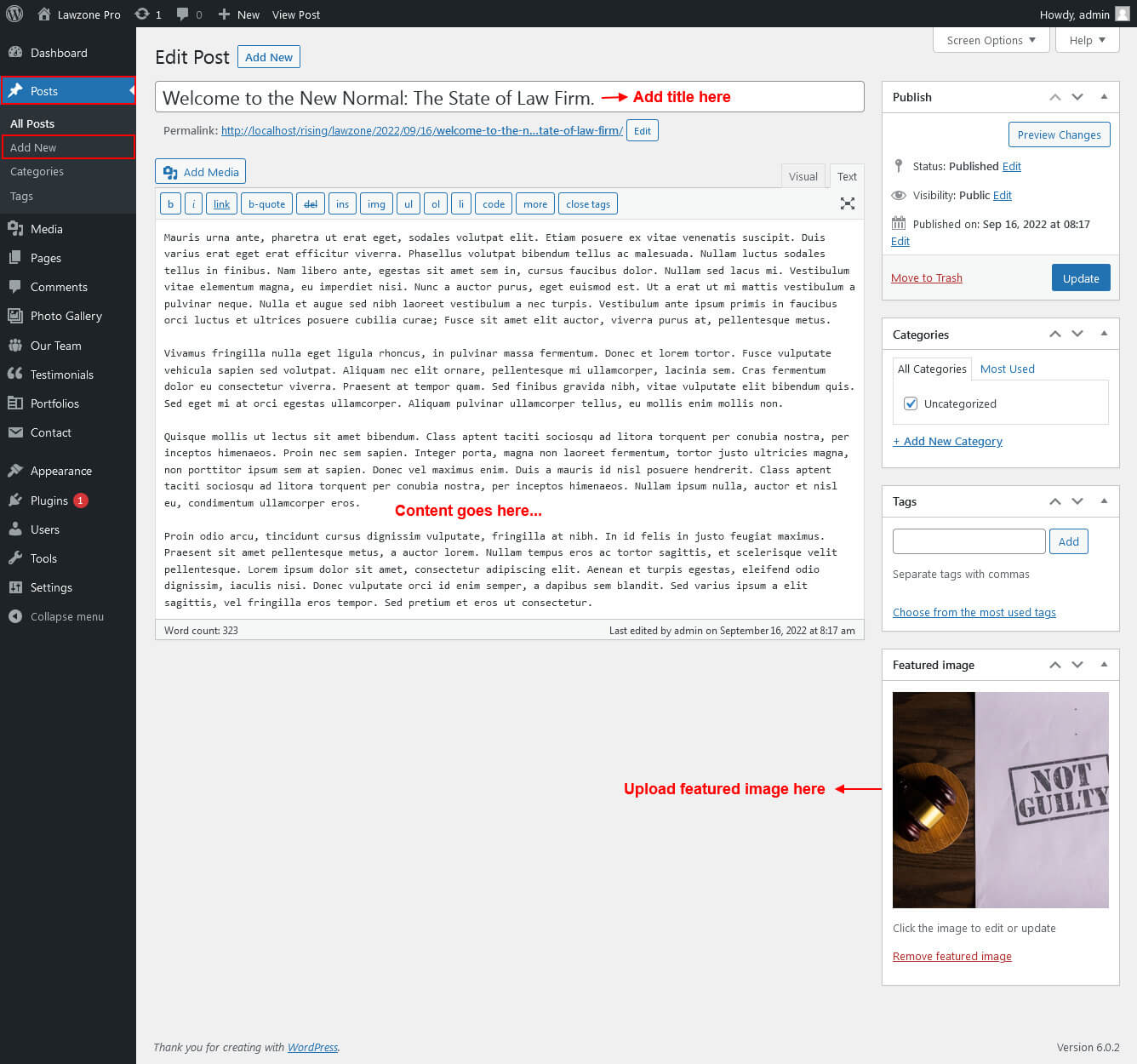
This section is used to display Check Our Top Recent News from Market Posts in your website
- First of all create new posts from Posts -> Add Posts
- To manage this section go to Appearance » Theme Options » Sections » Section 10
- Use this shortcode to display Latest News posts type Grid: [latest-news show="3" type="grid" column="2/3/4" date="show/hide" comment="show/hide" author="show/hide" category="show/hide"]
- Use this shortcode to display Latest News posts type Slider: [latest-news show="-1" type="slider" comment="show" date="show" author="show" category="show"]
Footer
The Footer section consists of four main elements:
- Get In Touch
- Practice Areas
- Recent Posts
- Opening Hours/Subscribe Now
- Copyright & Design by text
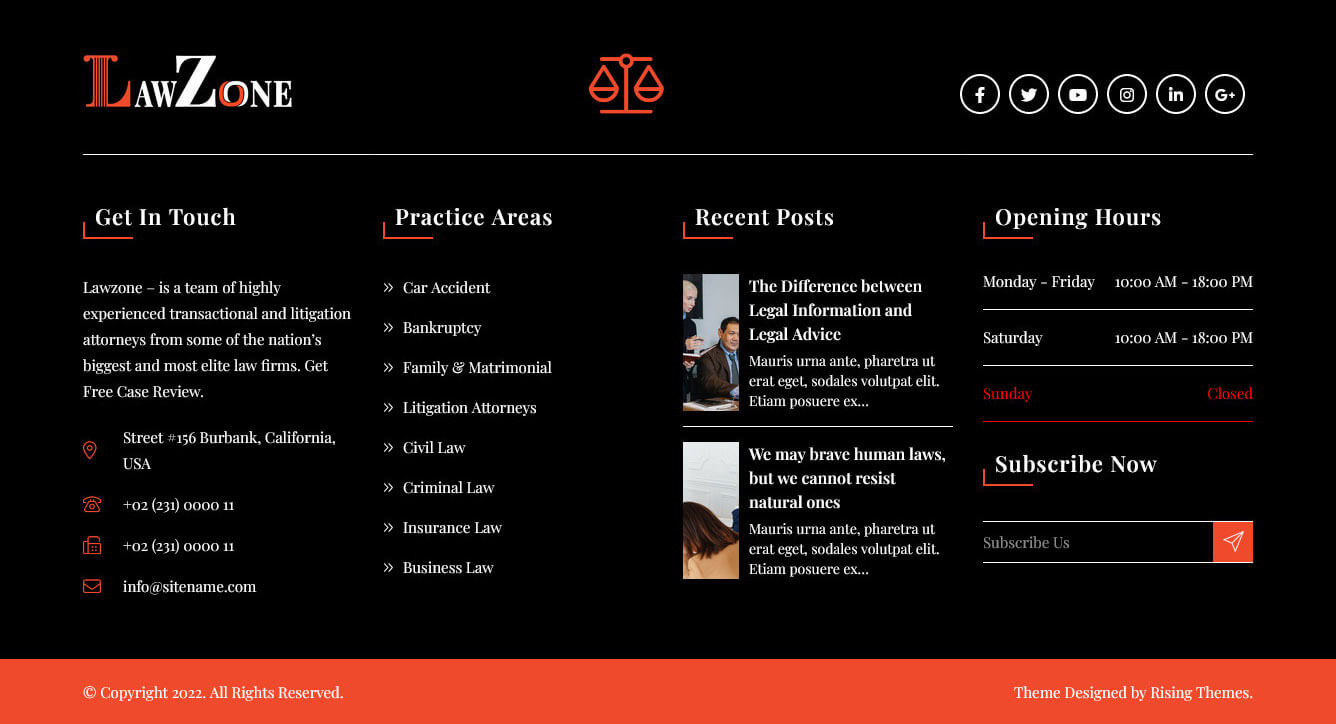
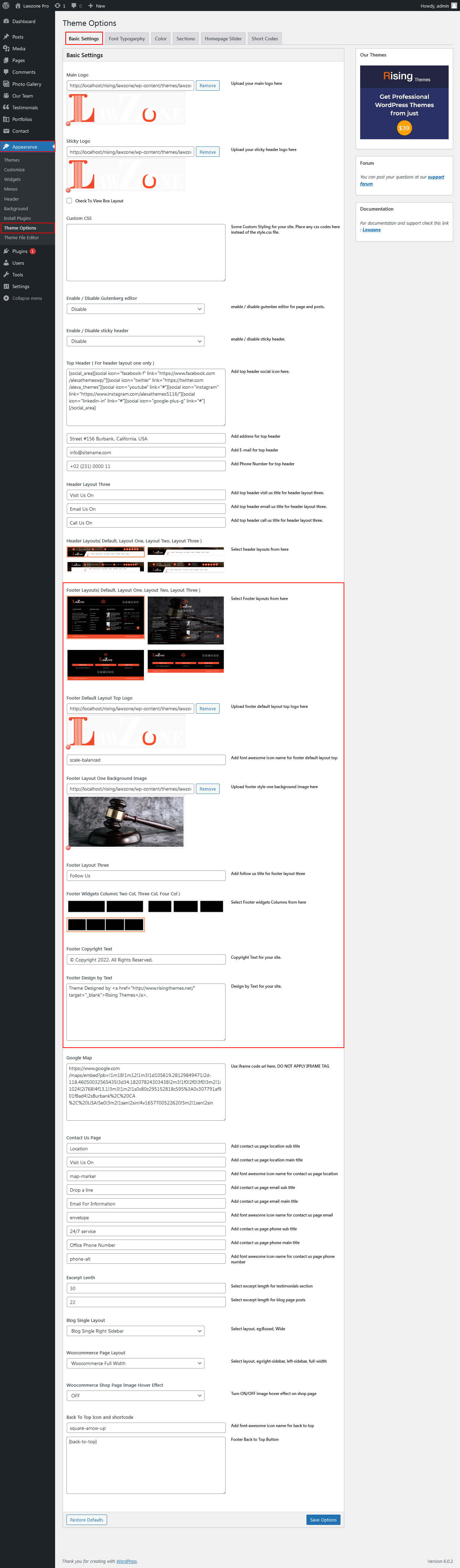
To manage footer section go to the Appearance » Theme Options » Footer
Page Templates & Sidebars
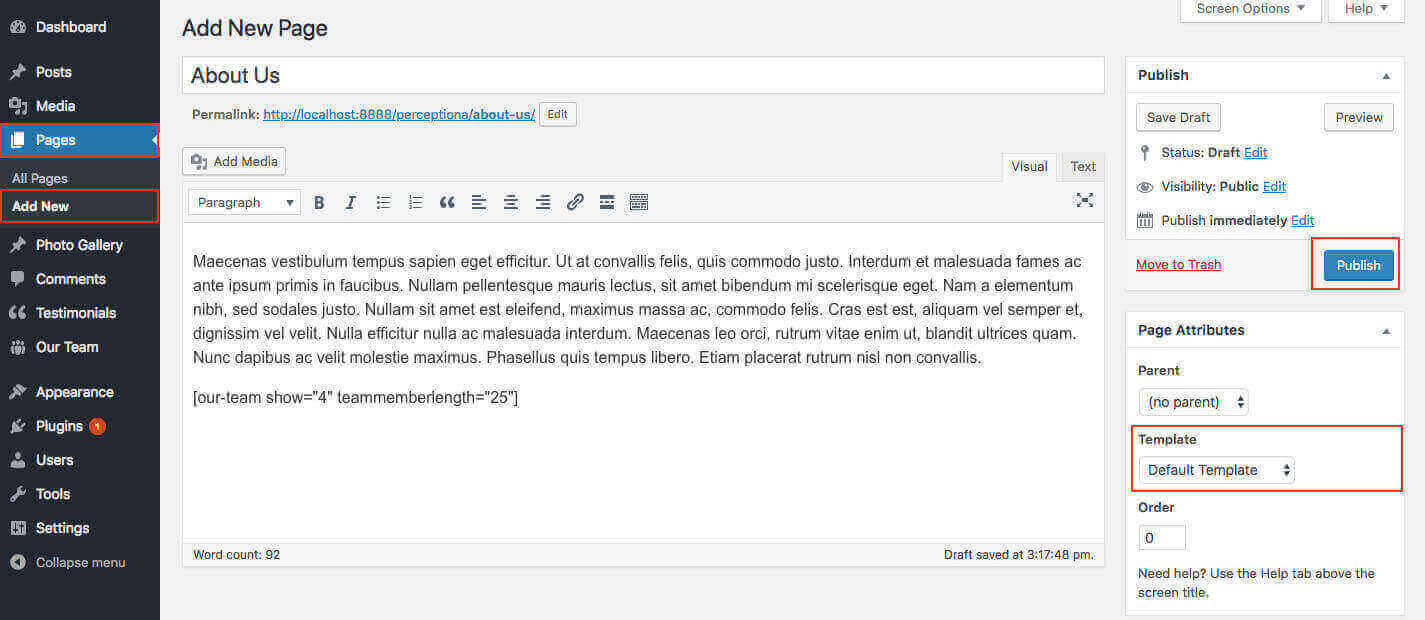
When you create a new page from the Pages » Add New section, the "Default Template" is assigned to the page by default. The default page template is a standard page template that can be with a sidebar or full-width layout and can contain custom content.
- Default Template
- Used to setting up the content on any page with Right Sidebar
- Left Sidebar
- Used to setting up the content on any page with Left Sidebar
- Full Width
- Used to setting up the content on any page without Sidebar
- Full Screen
- Used to setting up the content on any page without Sidebar Full Screen
- No Sidebar
- Used to setting up the content in center on any page without Sidebar
- Contact Us
- Used to setting up the contact page.
Widgets
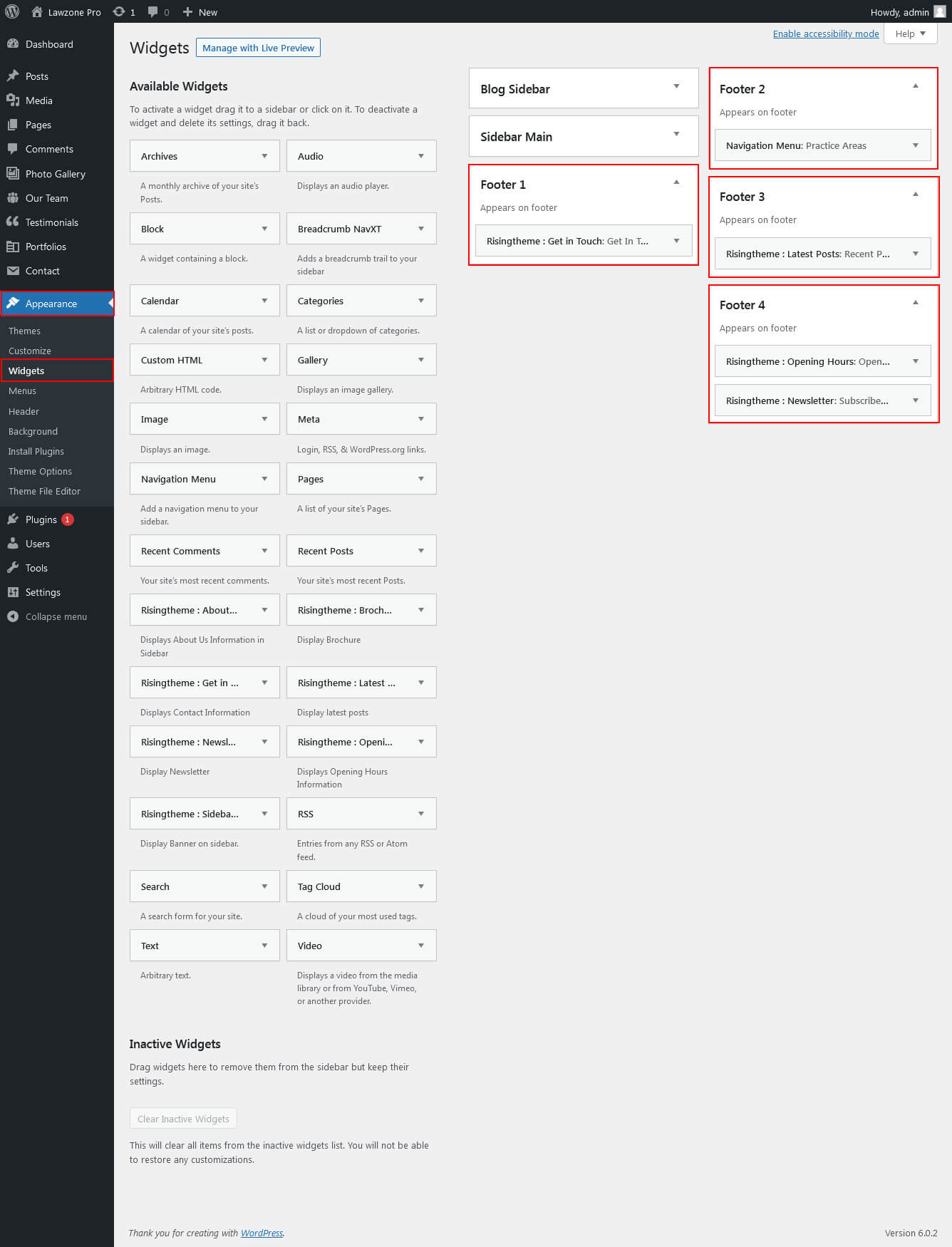
The WordPress widgets are used to manage sidebars:
- Can manage sidebar from widgets (exa. blog sidebar, main sidebar and shop widget)
- Footer section can manage from footer widgets 1,2.3,4
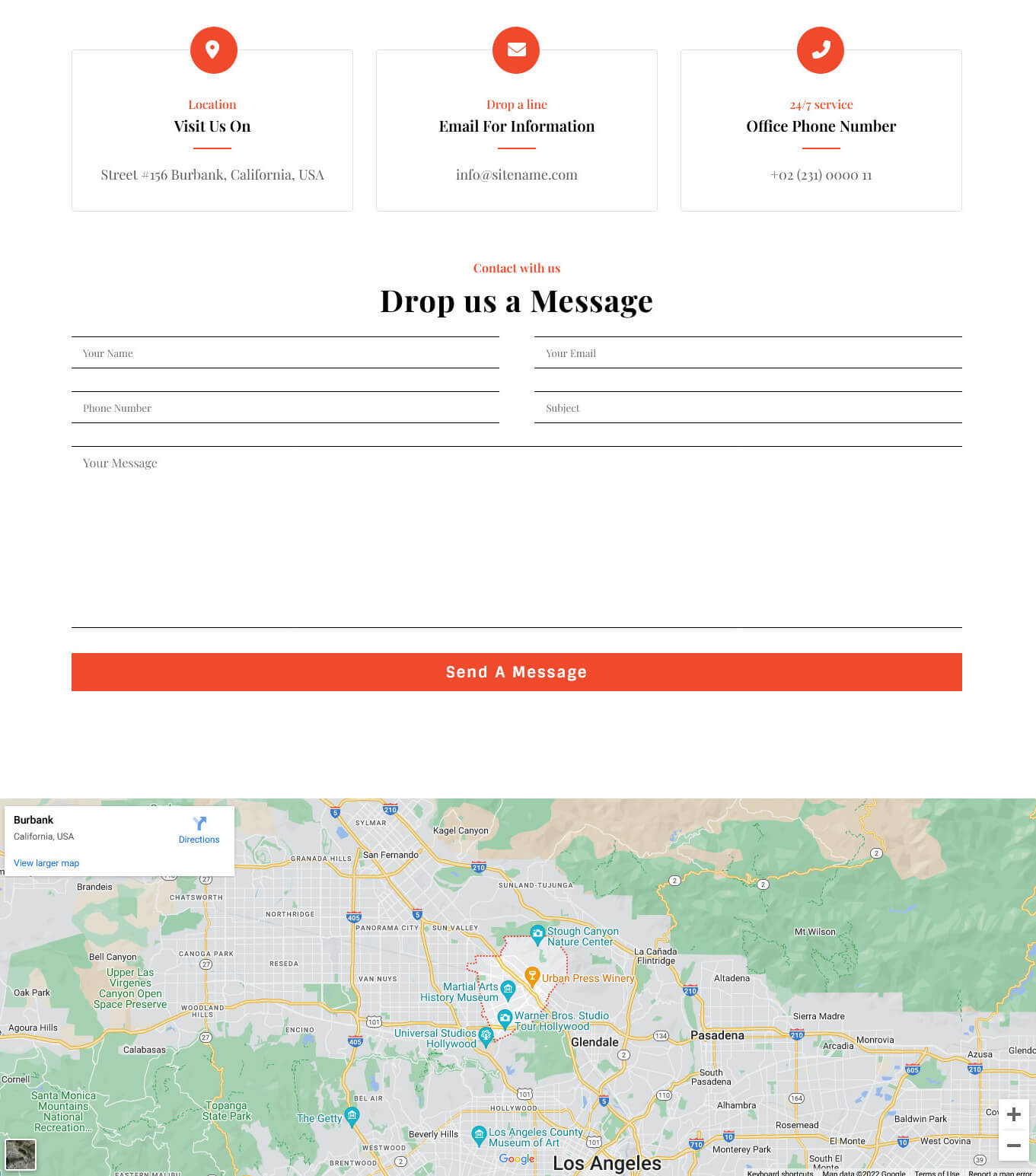
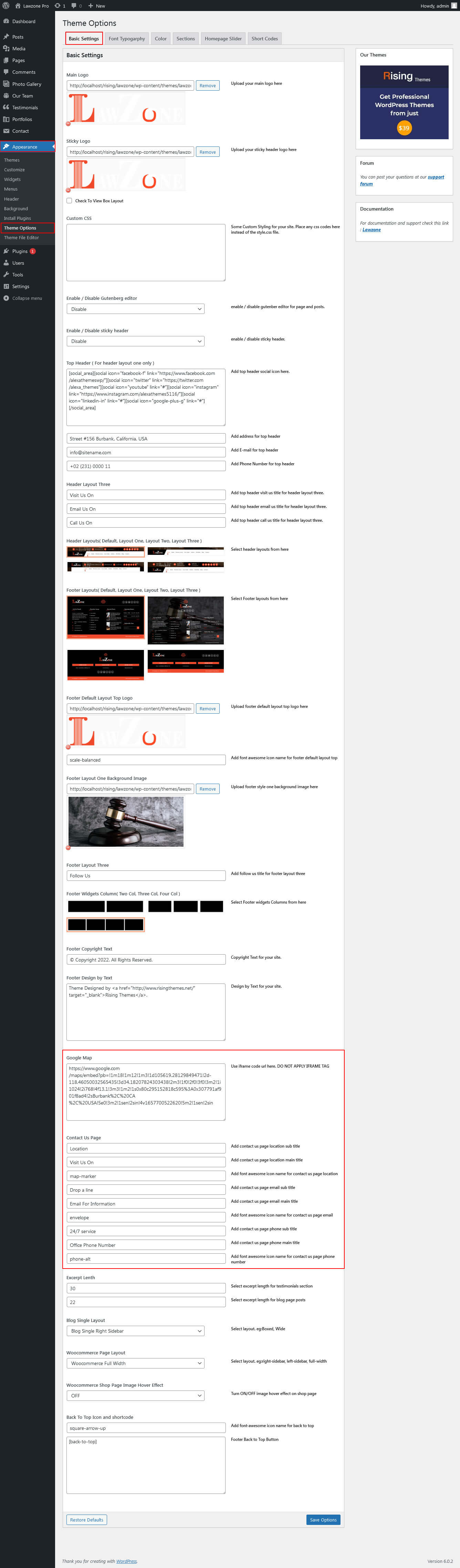
Contact Page
To view contact page shortcode go to Appearance » Theme Options » Contact Page:
Shortcodes
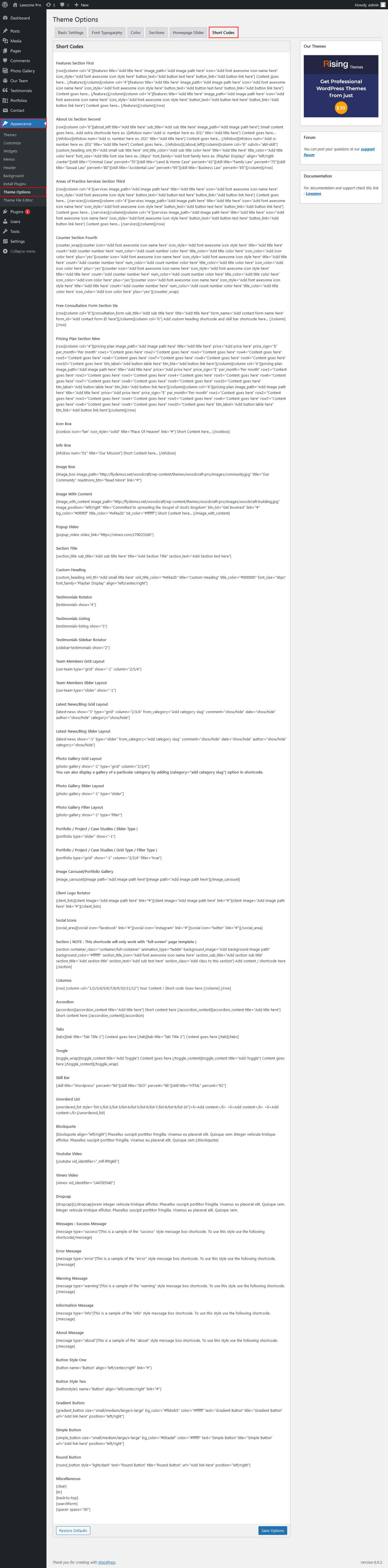
To view all shortcodes go to Appearance » Theme Options » Short Codes:
Basic Setting / Font Typography / Color
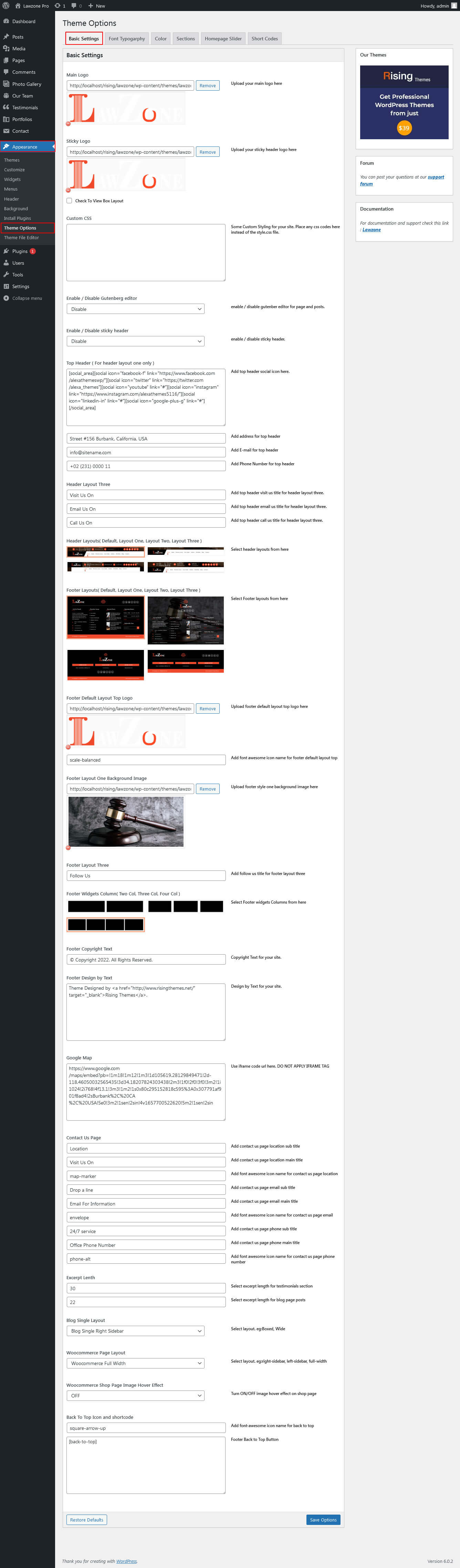
To view besic setting go to Appearance » Theme Options » Besic Setting :
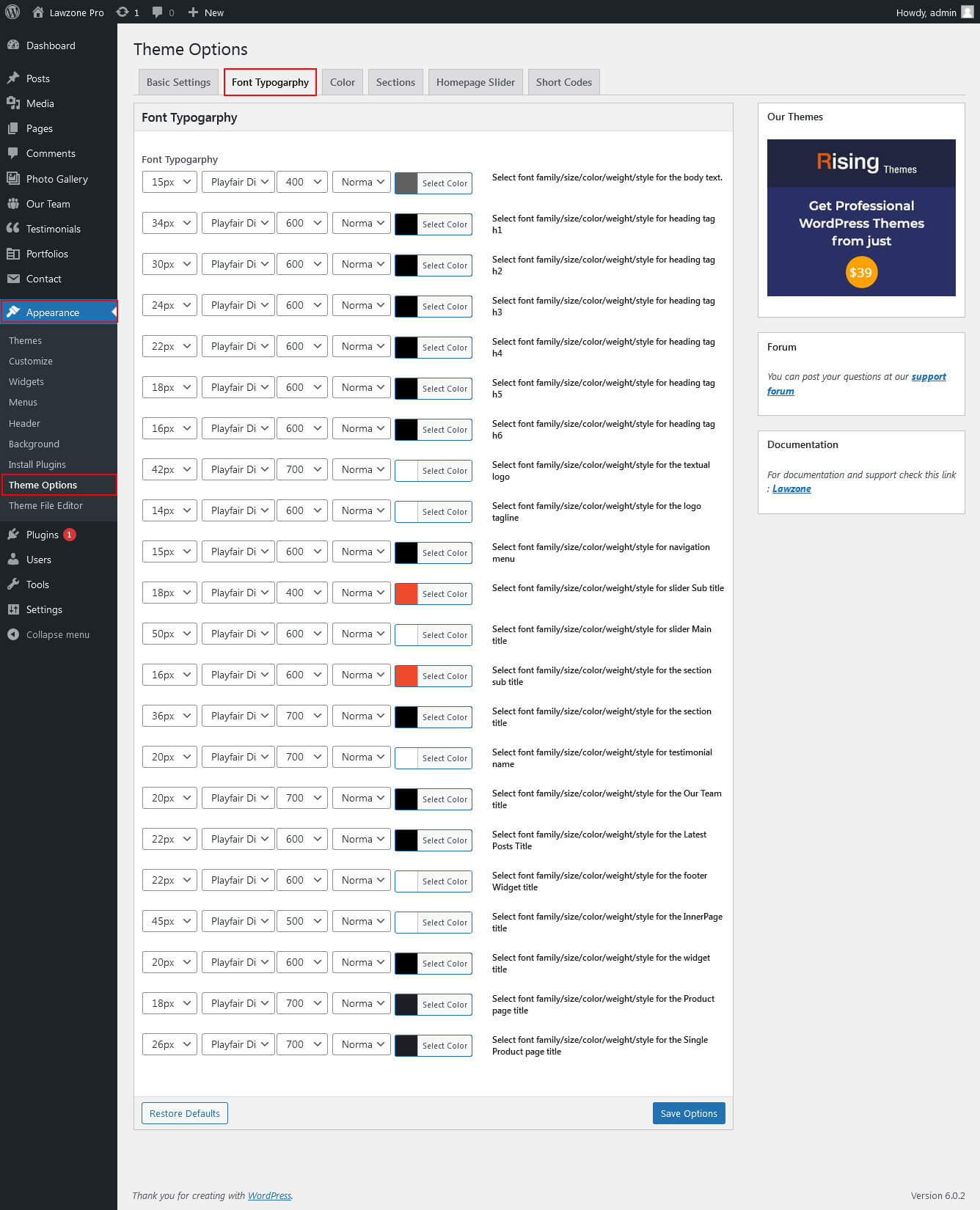
Font Typography
To view Font Typography go to Appearance » Theme Options » Font Typography :
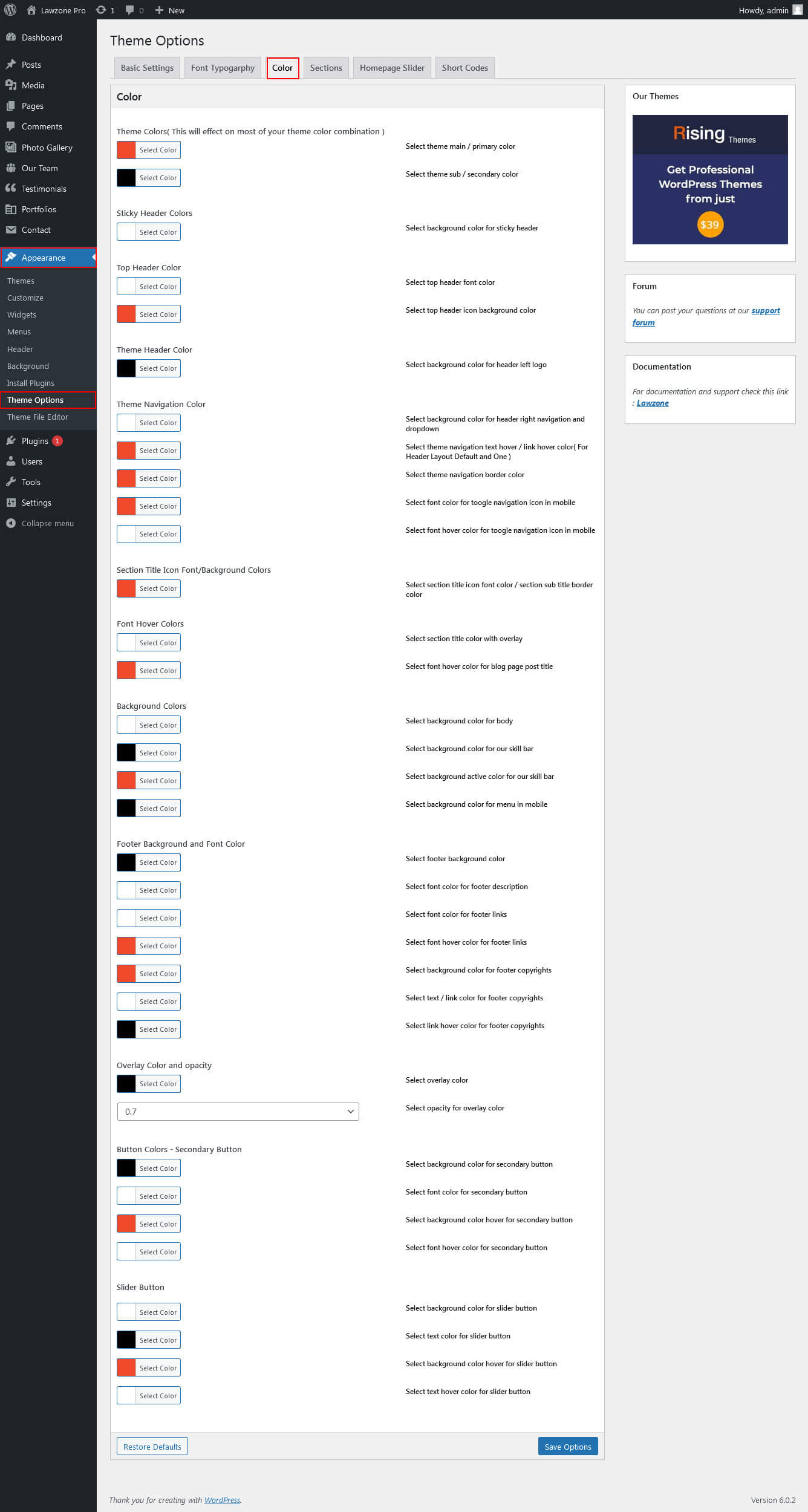
Color
To view Color go to Appearance » Theme Options » Color :
Portfolio
To view portfolio Page:
- First of all create new posts from Portfolio -> Add New
- Use this shortcode to display Portfolio type Grid : [portfolio show="no. of item to be shown( Note: -1 for displaying all items )" type="grid" filter="true/false" column="2/3/4"]
- Use this shortcode to display Portfolio type Slider : [portfolio show="no. of item to be shown( Note: -1 for displaying all items )" type="slider"]
- Use this shortcode to display Portfolio type Filter : [portfolio show="no. of item to be shown( Note: -1 for displaying all items )" type="grid" filter="true/false" column="2/3/4"]

Photo Gallery
To view photo gallery Page:
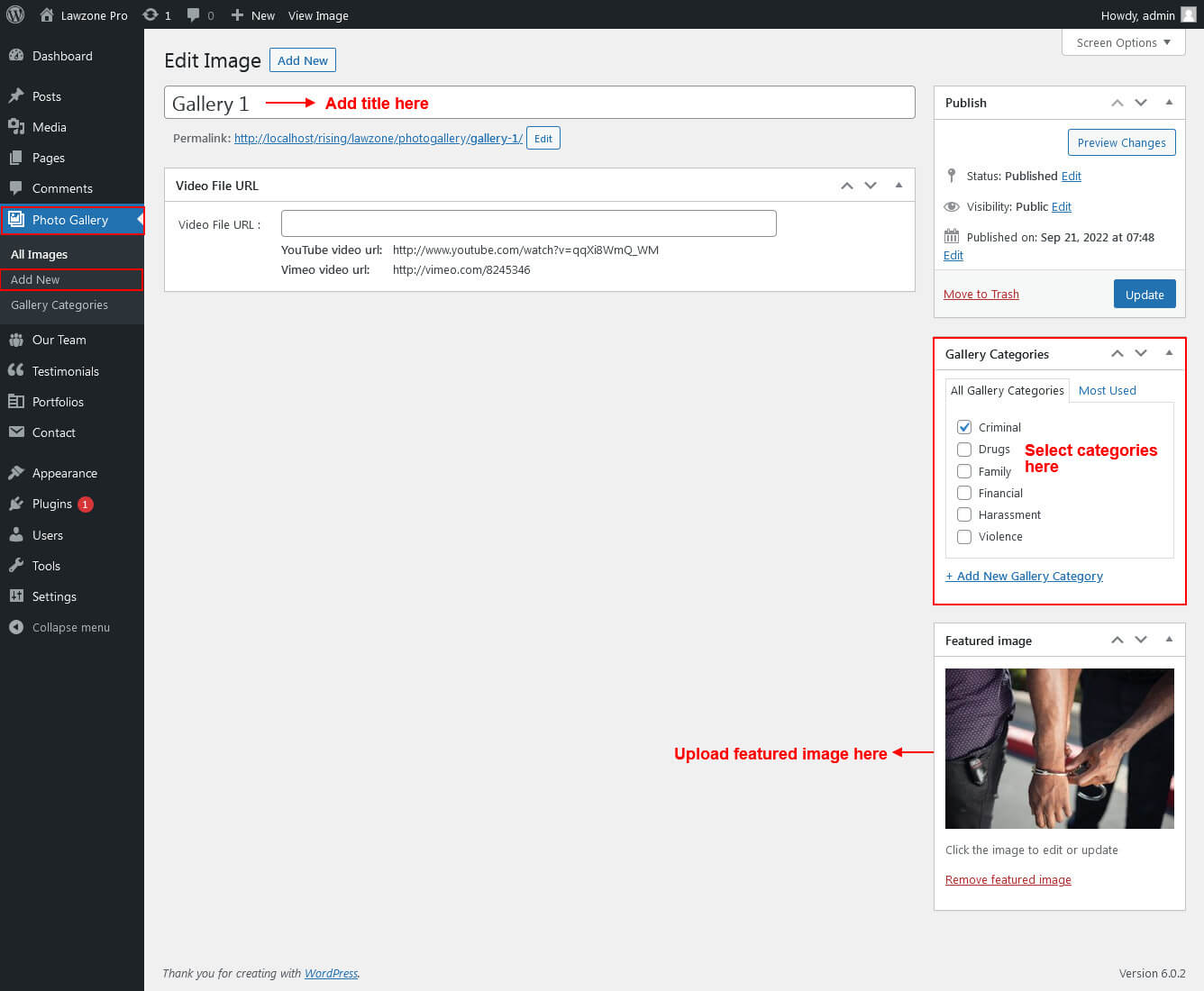
- First of all create new posts from Photo Gallery -> Add New
- Use this shortcode to display Photo Gallery type Grid : [photo-gallery show="no. of item to be shown( Note: -1 for displaying all items )" type="grid" column="2/3/4"]
- Use this shortcode to display Photo Gallery type Slider : [photo-gallery show="no. of item to be shown( Note: -1 for displaying all items )" type="slider"]
- Use this shortcode to display Photo Gallery type Filter : [photo-gallery show="no. of item to be shown( Note: -1 for displaying all items )" type="filter"]